What's New with VoiceXML 2.0?
1. Voice Browser Working Group
The Voice Browser Working Group was chartered by the World Wide Web Consortium (W3C) within the User Interface Activity in May 1999 to prepare and review markup languages that enable voice browsers. Members meet weekly via telephone and quarterly in face-to-face meetings.
The W3C Voice Browser Working Group is open to any member of the W3C Consortium. The Voice Browser Working Group has also invited experts whose affiliations are not members of the W3C Consortium. The four founding members of the VoiceXML Forum, as well as telelphony applications venders, speech recognition and text to speech engine venders, web portals, hardware venders, software venders, telcos and appliance manufactures have representatives who participate in the Voice Browser Working Group. Current members include AT&T, Avaya, BeVocal, BT, Canon, Cisco, Converse, Comverse, Dynamicsoft, General Magic, HP, IBM, Informio, Infospace, Intel, Lernout & Houspie, Loquendo, Lucent, Microsoft, Mitre, Motorola, Nokia, Nortel, Nuance, Open Wave, Phillips, Pipe Beach, Snowshore Networks, Speech Works, Sun, Syntellect, Telera, TellMe.com, Unisys, Verascape, VoiceGenie, Voxeo, in addition to several invited experts.
So what's new with VoiceXML 2.0?
Plenty.
What was a single language, VoiceXML 1.0, has been extended into several related markup languages, each providing a useful facility for developing web-based speech applications. These facilities are organized into the W3C Speech Interface Framework.
2. W3C Speech Interface Framework
The Voice Browser Working group has defined the W3C Speech Interface Framework, shown in Figure 1. The white boxes represent typical components of a speech-enabled web application. The black arrows represent data flowing among these components. The blue ovals indicate data specified using markup languages used to guide components to accomplish their respective tasks.
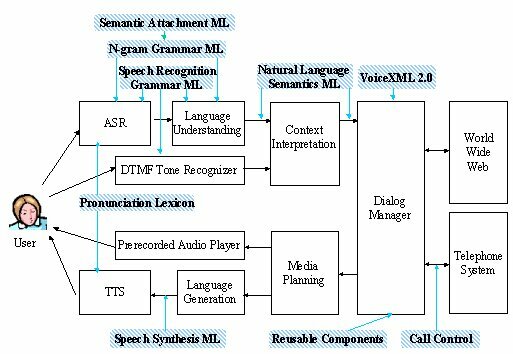
Figure 1. W3C Speech Inerface Framework
The components of any specific voice browser may differ significantly from the Components shown in Figure 1. For example, the Context Interpretation, Language Generation and Media Planning components may be incorporated into the Dialog Manager, or the tone recognizer may be incorporated into the Context Interpretation. However, most voice browser implementations will still be able to use of the various markup languages defined in the W3C Speech Interface Framework.
Components of the W3C Speech Interface Framework include the following:
Automatic Speech Recognizer (ASR)--accepts speech from the user and produces text. The ASR uses a grammar to recognize words from the user's spoken speech. Some ASRs use grammars specified by a developer using the Speech Grammar Markup Language. Grammars may contain elements of a Semantic Attachment Language which instruct the ASR how to generate a semantic representation of the meaning of the user's utterance. Other ASRs use statistical grammars generated from large corpora of speech data. These grammars are represented using the N-gram Grammar Markup Language. The ASR also uses the Pronunciation Lexicon to obtain pronunciations of words.
DTMF Tone Recognizer--accepts touch-tones produced by a telephone when the user presses the keys on the telephone's keypad. Telephone users may use touch-tones to enter digits or make menu selections.
Language Understanding Component--extracts semantics from a text string by using a prespecified grammar. The text string may by produced by an ASR or be entered directly by a user via a keyboard. The Language Understanding Component may also use grammars specified using the Speech Grammar Markup Language or the N-gram Grammar Markup Language. The output of the Language Understanding Component is expressed using the Natural Language Semantics Markup Language.
Context Interpreter--enhances the semantics from the Language Understanding Module by obtaining context information from a dialog history (not shown in Figure 1). For example, the Context Interpreter may replace a pronoun by a noun to which the pronoun referred. The input and output from the Context Interpreter is expressed using the Natural Language Semantics Markup Language.
Dialog Manager--prompts the user for input, makes sense of the input, and determines what to do next according to instructions in a dialog script specified using the VoiceXML 2.0 modeled after VoiceXML 1.0. Depending upon the input received, the dialog manager may invoke application services, or download another dialog script from the web, or cause information to be presented to the user. The Dialog Manager accepts input specified using the Natural Language Semantics Markup Language. Dialog scripts may refer to Reusable Dialog Components, portions of another dialog script which can be reused across multiple applications. The Dialog Manager may fetch dialog scripts from the Web for interpretation, and submit changes to databases on the Web. The Dialog Manger may also issue telephony control commands to the Telephone System. The Dialog Manager uses the Call Control Markup Language to control telephone connections.
Media Planner--determines whether output from the dialog manager should be presented to the user as synthetic speech or prerecorded audio.
Recorded audio player--replays prerecorded audio files to the user, either in conjunction with, or in place of synthesized voices.
Language Generator--Accepts text from the media planner and prepares it for presentation to the user as spoken voice via a text-to-speech synthesizer (TTS). The text may contain markup tags expressed using the Speech Synthesis Markup Language which provides hints and suggestions for how acoustic sounds should be produced. These tags may be produced automatically by the Language Generator or manually inserted by a developer.
Text-to-Speech Synthesizer (TTS)--Accepts text from the Language Generator and produces acoustic signals which the user hears as a human-like voice according to hints specified using the Speech Synthesis Markup Language. The TTS also uses the Pronunciation Lexicon to obtain pronunciations of words.
The Voice Browser Working Group is also defining an architecture for Reusable Dialog Components. As their name suggests, reusable components can be reused in other dialog scripts, decreasing the implementation effort and increasing user interface consistency. The Working Group may also define a collection of reusable components which solicit the user's credit card number and exploration date, solicit the user's address, etc.
3. Individual Markup Language Overviews
To review the latest requirement and specification documents for each of the following languages, see the section titled Requirements and Language specification Documents on our W3C Voice Browser home web site. The remainder of this section contains a brief overview of four of these markup languages.
3.1. VoiceXML 2.0
The VoiceXML 2.0 supports four I/O modes: speech recognition and DTMF as input with synthesized speech and prerecorded speech as output. VoiceXML 2.0 supports system-directed speech dialogs where the system prompts the user for responses, makes sense of the input, and determines what to do next. VoiceXML 2.0 also supports mixed initiative speech dialogs. In addition, VoiceXML 2.0 also supports task switching and the handling of events, such as recognition errors, incomplete information entered by the user, timeouts, barge-in, and developer-defined events. Barge-in allows users to speak while the browser is speaking. The VoiceXML 2.0 is modeled after VoiceXML 1.0 designed by the VoiceXML Forum, whose founding members are AT&T, IBM, Lucent, and Motorola. VoiceXML 2.0 contains clarifications and minor enhancements to VoiceXML 1.0. VoiceXML also contains a new <log> tag for use in debugging and application evaluation.
As an example, the following is a dialog fragment used in a system-directed speech dialog that prompts the user for a the size of a pizza. The grammar is expressed using the XML speech grammar notation.
<field name="pizza_size"/>
<prompt>What size pizza?</prompt>
<grammar mode="speech">
<rule id="rule" scope="public">
<one-of>
<item tag>small</item>
<item tag>medium</item>
<item tag>large</item>
</one-of>
</rule>
</grammar> |
This dialog fragment consists of a single prompt, "Which size pizza?" and a grammar that describes valid values that the user may say in response to the prompt. If the user responds with a pizza size of "large", the ECMAScript string value "large" would be assigned to the "pizza_size" field.
As another example, the following is a dialog fragment in which the user speaks a sentence containing several pieces of information. This example assumes that the pizza grammar illustrated above is stored in a separate file named "pizza_order.gram".
<form id="Ajax" >
<grammar src="order.grm" type="application/grammar"/>
<initial name="start">
<prompt>
<voice gender="female" category = "adult">
Welcome to <emphasis level="strong">Ajax Pizza. </emphasis>
</voice>
</prompt>
</initial>
<field name="order">
<prompt> What would you like to order?</prompt>
</field> |
The Voice Browser Working Group reviewed over 250 change requests to VoiceXML 1.0, resulting in numerous clarifications, corrections, and explanations to VoiceXML 1.0, resulting in VoiceXML 2.0.
Continued...

back to the top

Copyright © 2001 VoiceXML Forum. All rights reserved.
The VoiceXML Forum is a program of the
IEEE Industry Standards and Technology Organization (IEEE-ISTO).
|


